Most "best AI tools for small business" posts are useless. They rank 50 tools by popularity, name-drop every buzzy startup from the last two years, and never tell you what any of them replace. You read one, feel informed, buy two or three, and a month later you're using zero.
This is the other kind of list. Nine tools, one per business function, with real pricing and a clear answer to the only question that matters: what work does this remove from your week? Plus a budget map so you can pick a stack at $0, $100, or $500 a month depending on how fast you want to move, and the common mistakes I watch small businesses make when they buy AI tools without a plan.
How to think about AI tools in 2026
Ask two questions of every tool you consider:
- What work does this replace?
- Who owns the output?
If you can't answer both, don't buy it. A ten-person team with 40 AI subscriptions and no owners gets nothing. A ten-person team with five tools and one clear owner per tool gets 30% of their week back.
I'll group tools by business function because that's how buying decisions actually happen. "Sales follow-ups take every Monday morning" is a real problem you can solve this week. "We need an AI strategy" is not.
Writing and content
Top pick: Claude ($20/month Pro, $25/user Team)
Claude is better than ChatGPT at two things that matter for content work: following brand voice over long documents, and refusing to invent sources. The 200k context window means you can paste your entire positioning doc, style guide, and past posts, then ask for a new blog draft that actually sounds like you.
Use it for: blog drafts, landing page copy, email sequences, competitive research writeups, client proposals.
Runner-up: ChatGPT Plus ($20/month) or Team ($25/user)
Still the best all-purpose assistant. GPT-4o handles images, voice, and spreadsheets better than Claude. If your team is already paying for it, don't switch. Add Claude for long-form content and keep ChatGPT for everything else.
Skip: Jasper, Copy.ai, Writer
These wrapped GPT-3 in a nice UI and charged extra for it. In 2026, you can do the same work in Claude or ChatGPT with one good system prompt. I haven't recommended a dedicated "AI writer" tool to a client in over a year.
Sales and CRM
Top pick: Attio + Clay combo (~$70-150/month combined)
Attio is the CRM that feels like it was built for 2026, not 2015. Native AI fields, clean data model, actually pleasant to use. Clay handles enrichment and outbound: drop in a list of companies, Clay finds the right contacts and personalizes the first line of outreach automatically.
For teams under ten people doing outbound sales, this pair replaces a sales stack that used to cost around $2,000/month when it meant Salesforce + Outreach + ZoomInfo + Apollo.
If you need simpler: HubSpot Starter with Breeze AI (~$20/user/month)
HubSpot finally made AI useful across the CRM in 2025. Breeze drafts follow-ups, predicts deal risk, and generates reports you can hand a founder. Starter tier is fine for most teams under 20.
Skip: Salesforce Einstein for small business
Einstein is enterprise software with enterprise pricing. If you have fewer than 20 salespeople, you're buying the brand, not the product.
Customer support
Top pick: Intercom Fin (pay per resolution, around $0.99/resolved ticket)
Fin is the only AI support tool I've seen resolve over half of all tickets without human intervention in the wild. The 2025 rework added proper source citations so customers can verify answers. Pay per resolved ticket, not per seat, which actually makes sense for small businesses with spiky support volume.
Runner-up: Plain ($49/user/month)
If you're a B2B software company with technical customers, Plain is the best customer support UI of the last five years. The AI layer on top is young but the underlying product is so good the rest doesn't matter yet.
Skip: Zendesk AI and Ada for teams under 30
Too expensive for the value at small scale. Come back to them when you have 20+ support tickets a day.
Operations and automation
Top pick: n8n (self-hosted free, or $20-50/month cloud)
n8n is what Zapier should be. Open source, runs on your own server if you want privacy, integrates with every model, and added proper AI agent nodes in 2025. If your team has one technical person, this is where you should start.
Runner-up: Zapier ($20-70/month for small business tier)
Still the easiest way to connect two services without writing code. Zapier's new AI Actions let you run Claude or GPT inside a zap without extra setup. Pick Zapier if "ease of use" matters more than running costs or data privacy.
Skip: Make.com unless you've outgrown Zapier
Make has more power than Zapier, but the learning curve is steep. Worth it only if Zapier isn't enough and n8n doesn't fit your team.
Research
Top pick: Perplexity Pro ($20/month)
Perplexity replaced Google for research in my workflow. Deep Research mode (2025 addition) does multi-step research that used to take me half a day in about four minutes. I still double-check sources, but the grunt work is done.
Runner-up: NotebookLM (free from Google)
Free. Takes up to 50 sources per notebook. Generates audio summaries that are weirdly good for commute listening when you're getting up to speed on a topic. Use it for your own research library, not sensitive client work (Google trains on the free tier).
Design and images
Top pick: Ideogram + Recraft (combined around $30/month)
Ideogram is the only image model that reliably produces readable text inside images, which matters for marketing assets like social cards and ad creative. Recraft handles brand-consistent illustrations and SVG export. Between them, you don't need Canva AI or Midjourney unless you're running art for a magazine.
If you already use Canva: Canva Magic Studio
Already built into Canva Pro. Fine for social posts and quick graphics. Not as polished as Ideogram for marketing assets you'll run ads on.
Meetings
Top pick: Granola ($18/month)
Granola records, transcribes, and summarizes calls, but the thing that makes it different is its note-taking mode: you type your own messy notes during the call and Granola organizes them with transcript context at the end. It's how I take notes on every client call now.
Skip: Otter.ai
Otter was great in 2023. Granola and Fathom passed it in 2025 and haven't looked back.
Code
Top pick: Claude Code (included in Claude Pro, $20/month)
If anyone on your team writes code, Claude Code is the single highest-impact AI tool in 2026. It runs in the terminal, reads your whole project, and makes changes you can review like a pull request. I built this site and several client projects with it this quarter.
Runner-up: Cursor ($20/month)
If your developers want a visual IDE, Cursor is where most of the serious AI coding community lives. Strong multi-file edits, good autocomplete, clean diff UI.
Skip: GitHub Copilot as your only tool
Copilot is fine for autocomplete but falls behind Claude Code and Cursor for anything beyond single-file edits.
Finance and accounting
Top pick: Puzzle ($49-199/month) or Digits ($40/month)
Both use AI to categorize transactions and produce monthly books automatically. For businesses under $5M in revenue, either one removes the need for a part-time bookkeeper.
Skip: QuickBooks "AI" features
Marketing paint on a 20-year-old product. Move off it if you can.
Top picks at a glance
| Function | Top pick | Monthly cost | What it replaces |
|---|---|---|---|
| Writing/content | Claude Pro | $20 | ChatGPT + Jasper + Copy.ai |
| Sales/CRM | Attio + Clay | $70-150 | Salesforce + Outreach + Apollo |
| Customer support | Intercom Fin | ~$0.99/resolution | 1-2 support hires |
| Operations | n8n (self-hosted) | $0-50 | Zapier Pro |
| Research | Perplexity Pro | $20 | Google + hours of clicking |
| Design | Ideogram + Recraft | $30 | Canva Pro + Midjourney |
| Meetings | Granola | $18 | Otter + manual note-taking |
| Code | Claude Code | $20 (in Claude Pro) | Copilot + StackOverflow |
| Accounting | Puzzle | $49-199 | Part-time bookkeeper |
The budget map: $0, $100, and $500 stacks
$0 stack -- test mode, 1-2 people
- ChatGPT free tier (GPT-4o with daily limits)
- Claude free tier
- NotebookLM free
- n8n self-hosted
- Google Workspace free tier tools
Covers about 80% of what a one-person or two-person team actually needs. The gaps: no team workspace for shared AI chats, limited usage during busy days, no priority models during peak hours. Good enough to validate whether AI fits your workflow before you pay anything.
$100/month stack -- lean, 3-5 people
- Claude Pro: $20
- ChatGPT Plus: $20
- Perplexity Pro: $20
- Granola: $18
- Ideogram: $20
Total: around $98/month. Covers writing, research, meetings, and marketing images. Add HubSpot free CRM and n8n self-hosted at no extra cost and you've got a real stack.
$500/month stack -- full setup, 5-10 people
- Claude Team (5 seats): around $125
- Attio + Clay: $150
- Intercom Fin: around $100 (assuming ~100 resolved tickets/month)
- Perplexity Pro (2 seats): $40
- Granola (3 seats): $54
- Ideogram + Recraft: $30
Total: around $499/month. That's real replacement value for one or two full-time hires across sales, support, and content.
What NOT to do
After watching small businesses buy AI tools for the last two years, the mistakes repeat.
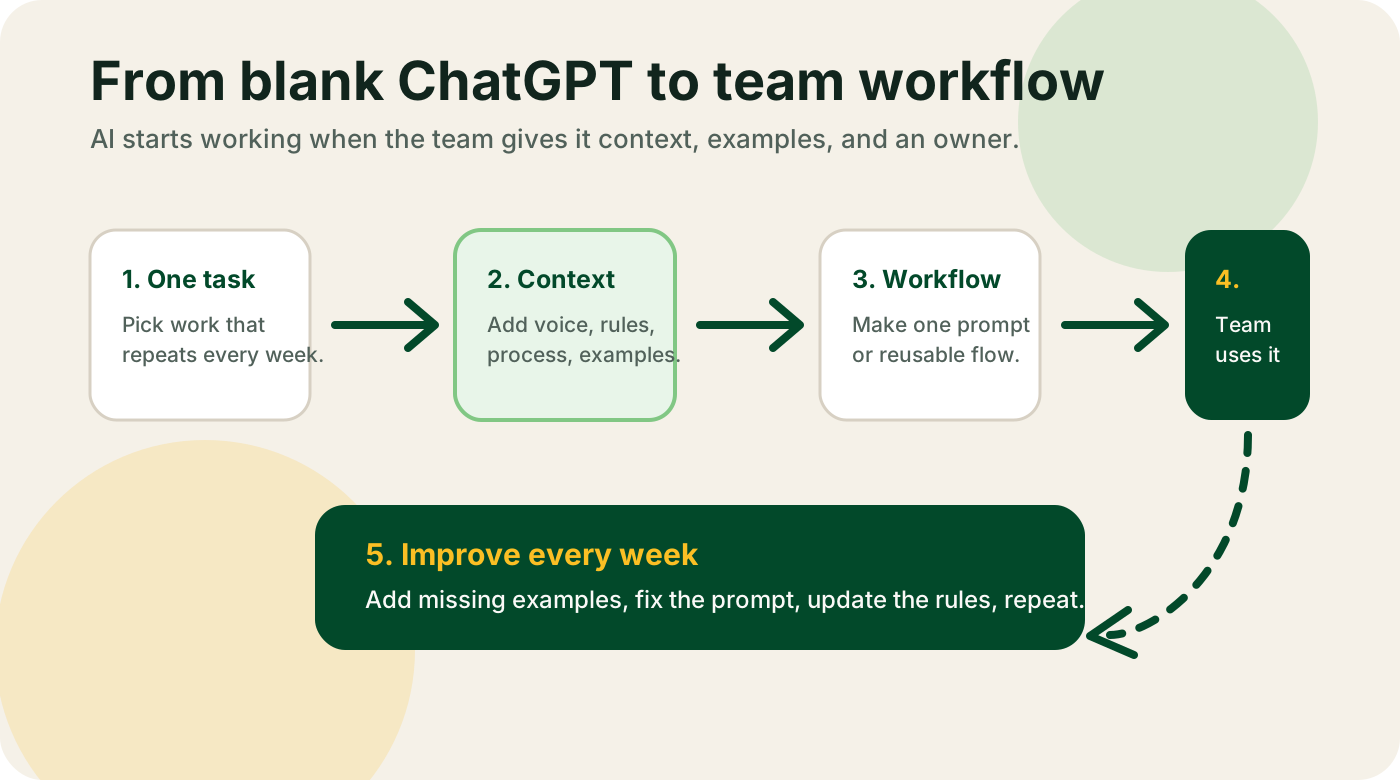
Don't start by buying tools. Start by picking one painful workflow. "Sales follow-ups take every Monday" is a workflow. "We should be more AI-powered" is not.
Don't assign AI as everyone's job. Pick one person per tool. They own setup, prompt writing, team training, and measuring whether it worked. If "everyone" owns it, nobody does.
Don't skip the prompts. The difference between "AI is useless" and "AI saved us 20 hours a week" is usually one good system prompt with your brand context, tone of voice, and examples of great past output. Spend a day writing it before you blame the tool.
Don't auto-publish AI output. For anything external -- customer emails, blog posts, support replies -- a human has to sign off. Always. If you skip this, you will publish something embarrassing by week two.
Don't measure usage, measure outcomes. "We ran 400 ChatGPT queries last week" tells you nothing. "Time to first customer response dropped from four hours to 20 minutes" tells you everything.
The 30-day starter plan
Week 1. Pick one workflow. Write down who owns it, how long it currently takes, and what "done" looks like. Skip anything that's hard to measure.
Week 2. Pick one tool to handle that workflow. Don't buy anything yet. Use free tiers. Write your prompts with real context from your business, and test them with three actual examples from last week.
Week 3. Run the tool in parallel with your current process for five real tasks. Compare output quality and time saved. Log both wins and failures.
Week 4. If it works, roll it out to the person who owns that workflow full-time and let them iterate. If it doesn't, write down exactly why and try a different tool or a better prompt. Don't add a second workflow until the first one is actually working.
If you try this and don't see at least a 30% time savings on the target workflow by day 30, the tool isn't the problem. The workflow was probably not a good fit for AI to begin with. Pick a different one and start over.
Getting help
If you've tried this and it didn't stick, or you want to skip the trial-and-error part, book a 2-week AI audit. I find the three workflows in your business where AI actually works, write a specific implementation plan with tools and owners, and help you ship the first one.
You can also browse the full AI tools directory for detail pages on every tool in this post, use my free AI tools like the ICP generator and positioning generator, grab ready-to-use prompts from the prompt templates, or download the AI starter kit with 35 prompts I actually use every week.