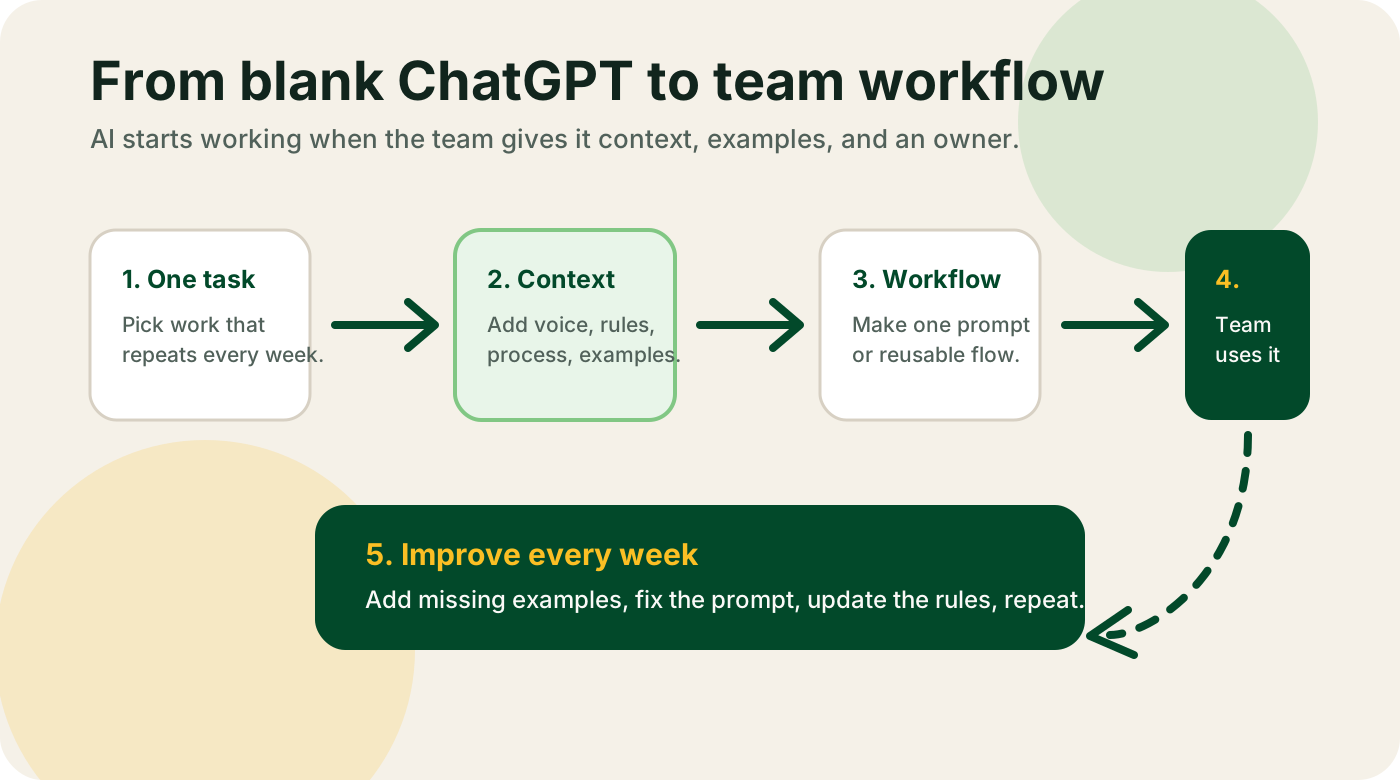
Most "how to implement AI in your business" articles describe a project plan that a 500-person company might run over a year. That plan doesn't work for a ten-person agency or a forty-person SaaS. Different shape, different budget, different pain.
This is the version I use with real clients. Four phases. Ninety days. One workflow at a time. A team of one to fifty people can run it without a consultant if they follow the order.
I'll walk through each phase with the specific questions to answer, the mistakes I see people make, and a time budget so you know when you're stuck versus on track. I'll also give you a 90-day timeline at the end so you can see what "good pace" looks like.
The framework: diagnose, design, guide, review
Four phases, in order, no skipping.
- Diagnose. Find out what work your business does and where the repetitive time sinks are.
- Design. Pick one workflow, one tool, one owner. Write the prompts. Set up the accounts.
- Guide. Run the workflow in parallel with the old one for two weeks. Fix what breaks. Train the owner.
- Review. Measure the outcome, decide what to do next, and move on to workflow two.
You run this loop for each workflow until AI is a normal part of how you operate. The first loop is the hardest. By the third or fourth, the team is picking workflows themselves and telling you how long each one will take. That's the goal.
The four phases map onto a 90-day calendar like this: week 1-2 diagnose, week 3-6 design and guide the first workflow, week 7-8 review and pick the next, weeks 9-12 design and guide the second workflow. At the end of 90 days you should have two workflows running, one person per workflow who owns it, and a short written playbook you can hand to the next hire.
That's it. Everything below is the detailed version.
Phase 1: diagnose
Time budget: 1 to 2 weeks, 4 to 8 hours of focused time.
Most AI implementations fail because the team picks a workflow before they understand what the team does. A founder thinks the support team needs help, when it's the billing team drowning in manual reconciliation. You can't know until you look.
Do this:
1. Map the top 10 workflows in your business. Write down the 10 things that take the most time on your team's calendars each week. Not strategic priorities -- the boring, repetitive work. For a services business, this usually looks like: onboarding new clients, writing proposals, drafting weekly reports, handling support emails, writing invoices, chasing late payments, posting content to socials, updating the CRM, running payroll, booking travel.
2. Time each one honestly. Ask the person who does each workflow how many hours per week it takes. You will be wrong by 2-3x if you guess yourself. People always spend more time on repetitive admin than their managers think.
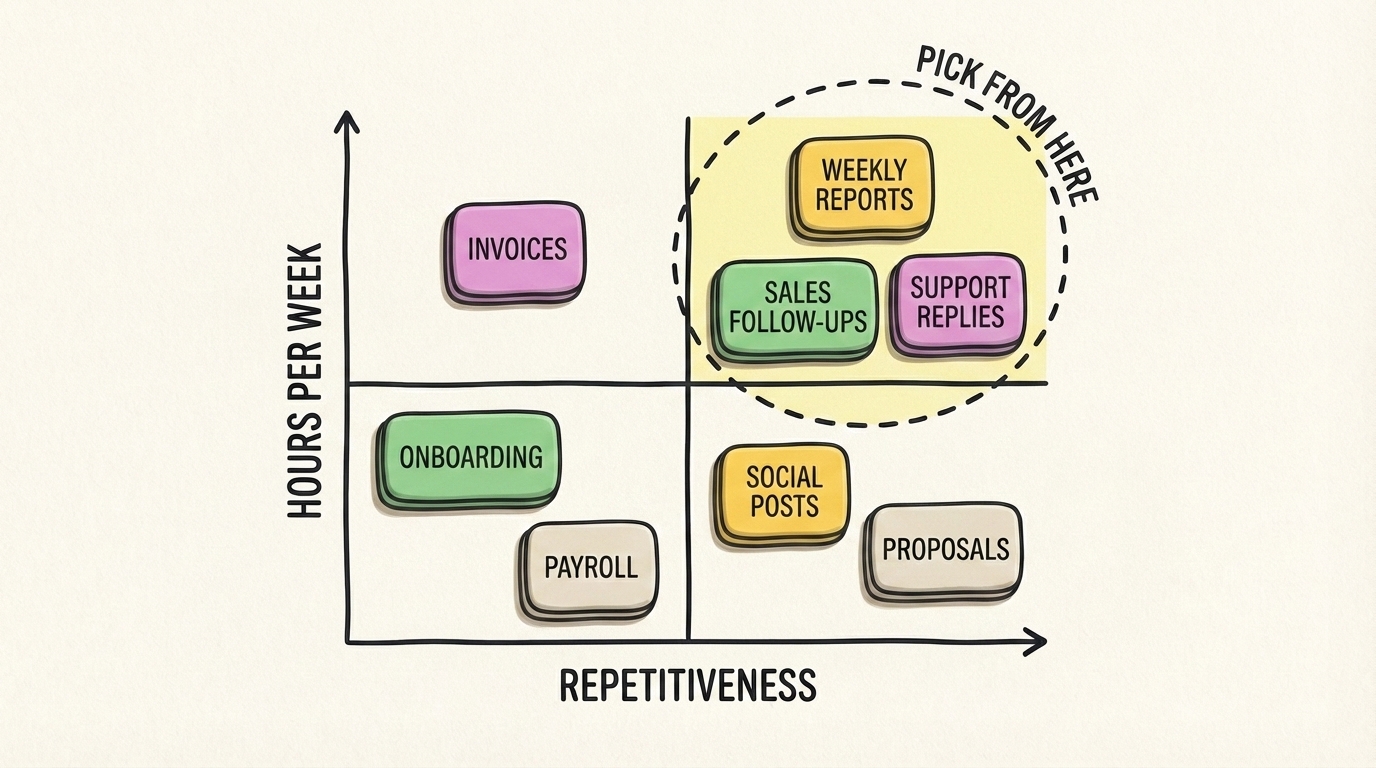
3. Score each workflow on two axes. For each workflow, give it a score of 1 to 5 on:
- Hours per week: 1 = under 1 hour, 5 = more than 10 hours
- Repetitiveness: 1 = every one is different, 5 = every one is basically the same
Multiply the two scores. Workflows with a combined score of 12 or higher are your top AI candidates. Under 8 is probably not worth automating.
4. Check the bottleneck. For the top 3 workflows, ask: what's the actual bottleneck? Is it writing the first draft? Finding the data? Making a decision? Getting approval? AI is extremely good at drafts and data gathering, medium at decisions, bad at approvals.
5. Pick one workflow to fix first. Not the biggest one. The highest score and the one where the bottleneck is a first draft or data gathering. Those are the wins you can ship in two weeks.
Common mistakes in phase 1:
- Picking the most "strategic" workflow instead of the most repetitive one. Strategy is a bad first AI project. Save it for month six.
- Skipping the time estimates because you think you already know. You don't.
- Letting the founder pick the workflow without asking the person who does the work.
- Picking more than one workflow to start with. Two is too many. One is the right number.
What you should have at the end of phase 1:
- A scored list of 10 workflows
- A clear first pilot, picked by the numbers
- The name of one person who will own it
- A rough estimate of hours per week that workflow currently consumes
If you don't have those four things, go back. Don't start building.
Phase 2: design
Time budget: 3 to 5 days, 4 to 8 hours.
Now you pick the tool and write the prompts. This is where most DIY projects stall because the team goes hunting for "the best AI tool" on Google, reads 17 blog posts, and buys three tools they never use.
Cut that loop with a rule: first pick the tool, then write the prompt, then set up one account. In that order.
Pick the tool. For 80% of small-business workflows, the right tool is Claude or ChatGPT with a good system prompt. Not a vertical SaaS. Not an AI agent framework. A plain LLM chat plus your specific instructions. If the workflow is writing drafts, picking ideas, summarizing content, answering questions from a knowledge base, or processing text -- that's a Claude or ChatGPT job.
Exceptions:
- Workflows that need to move data between apps: pick n8n or Zapier with an AI step.
- Workflows that need image generation: pick Ideogram or Recraft.
- Workflows that need phone calls or meeting notes: pick Granola.
- Workflows that need customer support replies at scale: pick Intercom Fin.
Any decent tool in these categories will do. Don't spend a week comparing.
Write the prompt. A good prompt for a business workflow has five parts:
- Context: who the business is, who the audience is, what the voice sounds like. Copy-paste from your website.
- Task: what the AI should do. One sentence. "Draft a weekly sales recap email for the founder based on the data below."
- Format: what the output should look like. Structure, length, tone. Be specific: "Four short sections with H3 headings, under 500 words total, casual tone, no emojis."
- Examples: one or two real examples of great past output. This is the part people skip, and it's the part that makes the difference between 60% quality and 90% quality.
- Constraints: what not to do. "Do not invent numbers. If data is missing, write '(needs data)' in that spot. Do not use buzzwords."
This prompt is the deliverable of phase 2. Save it somewhere everyone can edit it. I keep mine in a shared doc called prompts.md with one heading per workflow.
Set up one account. Pay for Claude Pro or ChatGPT Plus on one seat only. Not five. One. The owner of the workflow uses it, gets comfortable, and only then do you roll out more seats. Too many teams buy five seats on day one, only two people use it, and the founder wonders why AI "isn't working."
Common mistakes in phase 2:
- Buying four tools instead of one.
- Writing a three-line prompt and wondering why the output is generic.
- Skipping the "examples" section.
- Rolling out seats before anyone on the team has used the tool on a real task.
What you should have at the end of phase 2:
- One tool picked, one account paid for
- A full written prompt saved in a shared doc
- One named owner who has access
- A list of 3 to 5 real tasks from last week that the owner will try the workflow on
Phase 3: guide
Time budget: 2 weeks, 6 to 10 hours for the owner, 1 to 2 hours for you.
This is the phase where AI implementations work or don't. Everything up to here is paperwork. Guide is where the workflow starts running in parallel with the old one and you debug until it holds up.
Week 1: parallel run. The owner runs the new AI-assisted workflow alongside the old manual one for every real task that comes in. The old workflow still ships to customers. The AI one is just training wheels. At the end of each day the owner writes down two things:
- What worked (AI output was better than expected)
- What broke (AI output was worse, missed info, wrong tone, factually off)
Every time something breaks, update the prompt. Not the tool. The prompt. I've watched teams switch tools after two bad outputs when the fix was adding three sentences to the system prompt. Don't fall for that.
Week 2: cut over. If the owner's daily notes show the AI workflow matching or beating the old one on 4 out of 5 tasks, cut over. The new workflow becomes the real one. The owner stops running the manual fallback. You keep the old instructions written down somewhere in case the tool goes down for a day, but nobody uses them.
If week 1 didn't hit 4 out of 5, don't cut over. Keep parallel running and keep improving the prompt. If week 2 still isn't working, the workflow probably wasn't a good AI fit. Kill it and go back to phase 1 to pick a different one. Don't sink more time into a bad pilot -- it's cheap to admit and expensive to keep fighting.
Train the owner. During the parallel run, the owner should be the only person touching the AI tool. That sounds wrong to founders who want "the whole team trained." Resist. You want one person who knows how to run and maintain the workflow, not ten people who kind of get it. Once the workflow is stable, the owner trains the next person in 30 minutes.
Your job during phase 3. Unblock the owner, fix one thing a week, and resist the urge to add features. Every "oh we should also" is a distraction. Finish one workflow before adding scope.
Common mistakes in phase 3:
- Trying to train the whole team before the workflow is proven.
- Scrapping the tool after two bad outputs instead of fixing the prompt.
- Scope creep. "While we're at it, can it also..." No. Finish the first workflow.
- Measuring activity ("we used AI 50 times this week") instead of outcomes ("it took half as long").
What you should have at the end of phase 3:
- One working workflow in production
- An owner who can maintain it without you
- Honest data on how much time it saves per week
- A list of things that broke and how you fixed them -- this is your internal playbook
Phase 4: review
Time budget: 1 week, 2 hours.
Now you look at the result, decide if it was worth it, and pick the next workflow. This is a short phase but the one people skip, which is how small-business AI rollouts end up as a drawer full of unfinished pilots.
Answer four questions honestly:
- How many hours per week does this workflow now take? Compare to the original estimate from phase 1.
- Is the owner still using the tool, or did they drift back to the old way? If they drifted back, the workflow is not done, even if it technically "works." Find out why.
- What's the customer-visible quality? Is the output going to customers better, the same, or worse than before?
- What's the real cost per month? Tool subscriptions plus the owner's extra time for maintenance.
If the workflow saves real hours, keeps the owner engaged, and hasn't dropped quality, it's a success. If two of three are true, it's a partial success -- keep running it but don't expand yet. If only one or zero, kill it, keep the learnings, and start over with a better-scoped workflow.
Then pick the next workflow. Go back to your scored list from phase 1. The second-highest candidate is usually the next pilot. Start phase 2 again. By the time you've run the loop 3 or 4 times, each loop takes half as long as the first because you already have prompts, tools, and shared habits.
Common mistakes in phase 4:
- Skipping review entirely. This is the single biggest cause of stalled AI rollouts in small businesses. Teams ship one workflow, get excited, start five more, and none of them ever get reviewed or completed.
- Measuring activity instead of outcomes.
- Treating a partial success as a full win. It isn't. Partial means you still have work to do.
- Adding too many workflows in parallel. Never run two new pilots at the same time. One at a time, reviewed, and shipped.
What you should have at the end of phase 4:
- A one-page writeup: what the workflow does, who owns it, what it saves
- A decision on the next workflow to tackle
- A short internal playbook of "here's how we build AI workflows" that the second loop will be 30% faster because of
A 90-day timeline
This is what a realistic 90-day implementation looks like for a ten-person business starting from zero.
Week 1. Phase 1. Map workflows. Score them. Pick one.
Week 2. Phase 2. Pick the tool. Write the prompt. Set up one account. Get the owner ready with 5 real tasks to run.
Weeks 3-4. Phase 3, parallel run. Owner uses AI alongside manual process. Founder unblocks daily. Prompt evolves.
Weeks 5-6. Phase 3, cut over. AI workflow is the real workflow. Owner stops the parallel run. Document what breaks.
Week 7. Phase 4. Review workflow one. Measure honestly. Decide: continue, fix, or kill.
Week 8. Phase 1, second loop. Pick the second workflow. This time it takes a day, not a week.
Weeks 9-10. Phase 2 and early phase 3 for workflow two. Probably faster because the team has done this before.
Weeks 11-12. Phase 3 cut-over for workflow two. Phase 4 review coming up.
By day 90 you have two live workflows, two trained owners, real hours saved per week, and a team that knows how to do this on their own. That's the goal of the first 90 days. Not "AI everywhere." Two workflows, done properly, with people who can maintain them.
Common mistakes that kill small-business AI rollouts
I'll list these flat because each one has killed at least one rollout I've watched up close.
- Starting with "AI strategy" instead of a pilot. Strategy before evidence is a slideshow.
- No named owner per workflow. If it's "everyone's job" it's nobody's job.
- Skipping the parallel-run phase. Going directly from "we bought the tool" to "customers see the output" is how you publish something embarrassing.
- Measuring usage instead of outcomes. "We ran 400 prompts" is vanity. "Time to proposal dropped from 4 hours to 45 minutes" is the real number.
- Training the whole team too early. Train the owner first, let them prove it, then scale. Mass training before proof just teaches people that AI is confusing.
- Buying agents for problems that aren't agent-shaped. Most small-business workflows need one good prompt, not an autonomous agent that can hallucinate in 14 ways.
- Over-customizing the first pilot. The first pilot should be the smallest useful version. Ship first, improve second.
- Not writing anything down. If the prompts and playbook live in one person's head, they leave when that person does. Always write it down.
Fix these and the implementation part is mostly mechanical. The hard part is picking the right workflow and having the discipline to finish one before starting the next.
Getting help
If this feels like a lot, it is. It's also doable. Most small businesses can run the first loop themselves with the free AI starter kit, the AI tools directory, and a weekend of prompt writing. The second loop is easier than the first, and by the fourth you won't need me at all.
If you've tried this and bounced off, or you want somebody to run the first loop with you as a second pair of hands, book a 2-week AI audit and I'll run phase 1 and phase 2 with your team, then hand off the rest. You can also read what good AI consulting for small businesses looks like if you want to understand the difference between an advisor and an agency, or see the AI tools I recommend for each category.
The framework is small on purpose. Diagnose, design, guide, review. Four phases, one workflow at a time, 90 days to two working systems. Keep it that small and you'll beat every business that tried to "do AI" as a transformation project.