Every guide to AI consulting covers what a good engagement looks like. What the deliverables should be. What red flags to watch for. What the first two weeks should include.
This is not that guide.
This is the list of things most consultants leave out -- including me, when I'm moving fast and the client isn't pushing. These aren't rare edge cases. They're the gaps that kill AI projects in month two, after the consultant is gone and the workflow is theoretically "done." Your team stops using the tool, nobody knows why, and the project quietly gets blamed on "AI not being ready."
It was ready. These five things weren't.
Security and data handling
When you connect a business workflow to an AI tool, data moves. Customer names, email threads, support tickets, financial figures -- it leaves your systems, passes through a third-party API, and gets processed somewhere you don't control.
Most consultants don't walk you through this. Not because they're hiding it, but because clients rarely ask and the engagement moves fast.
Here's what you should know before any tool goes live:
Where does your data go? Every AI API call sends your input to a server. For OpenAI, Anthropic, Perplexity, and most consumer tools, that means US-based cloud infrastructure. For European businesses or anyone handling regulated data, this matters.
Are your prompts retained? Most providers log API calls for safety monitoring. Some offer zero-retention options on paid tiers. If you're passing customer data through prompts, find out before you build.
Is the vendor training on your data? OpenAI and Anthropic do not use API data to train their models by default. Many smaller or consumer-facing tools do. Check the terms of service, not the marketing page.
Who approves new AI tools at your company? If the answer is "nobody," that's a gap. You want one person -- usually the founder or ops lead -- who signs off before any AI tool touches real customer data. Not as bureaucracy, but as a single point of accountability when something goes wrong.
A good consultant raises all of this in week one, before a single workflow is built. If yours didn't, ask now.
Change management
Here's the thing most consultants know but understate: the technology is not the hard part.
Team habits are.
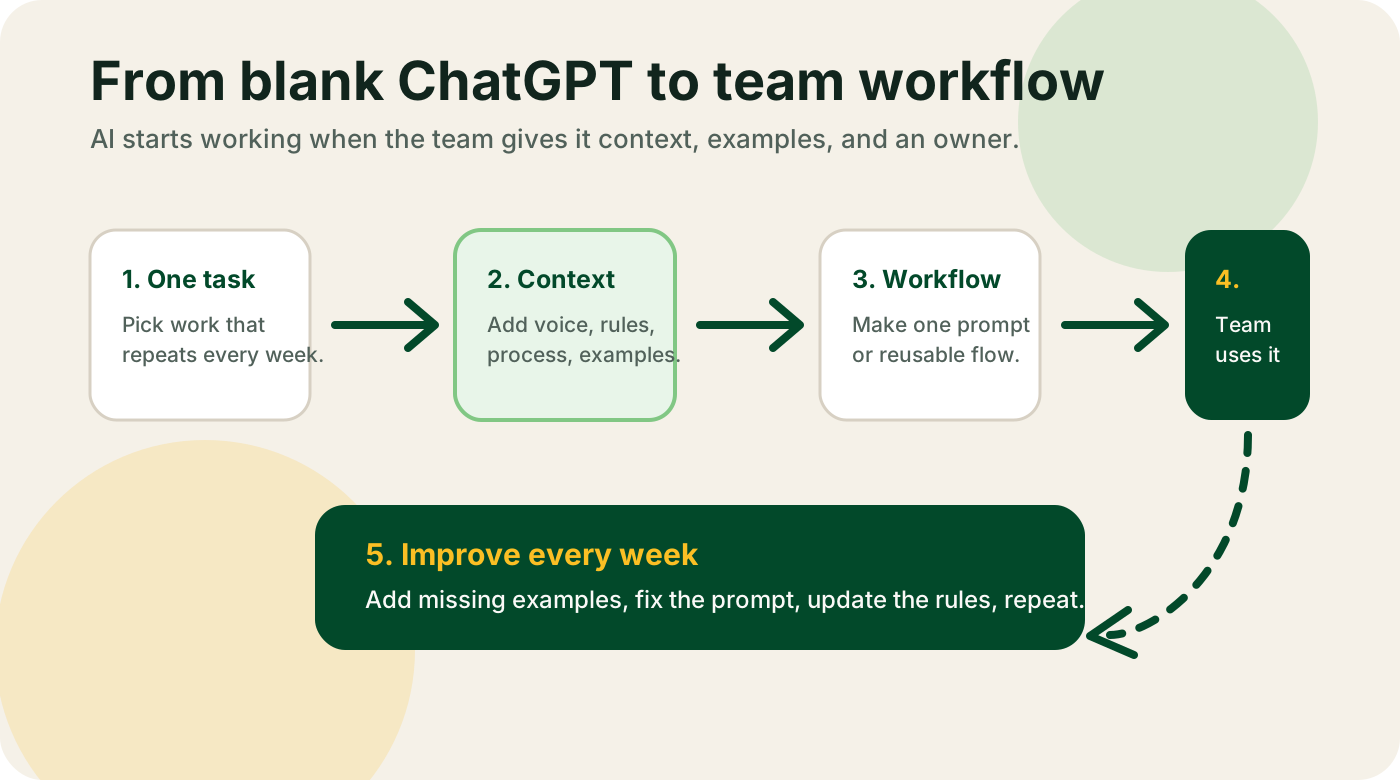
You can build a perfect AI workflow over two weeks. Right tool, right prompts, clean setup, real time savings. Then the consultant leaves, and by week four the team has quietly gone back to the old way. Not because the tool failed. Because nobody planned for the transition.
A few patterns that predict whether a workflow sticks:
The designated owner. One person has to own the tool after the handoff. Not as a side task -- as a real part of their job. If the consultant leaves without a clear owner, the workflow becomes orphaned software. Someone runs it when they remember, nobody runs it when they're busy.
The skeptic on the team. There's almost always one. The person who thinks AI is overhyped, or who has been burned by a previous tool rollout, or who simply doesn't want their workflow changed. A consultant who ignores this person and ships anyway is setting you up for passive non-adoption. The skeptic needs to be in the room during week two, not handed a finished product.
The first month of friction. AI workflows break in the first 30 days. Output is slightly off, a prompt produces the wrong format, the tool misreads an edge case. If your team hasn't been told to expect this -- and hasn't been told who to call when it happens -- the first bug becomes a story about why AI doesn't work.
The consultant's job isn't done when the pilot runs. It's done when the owner can maintain the tool, explain it to the skeptic, and handle the first bug without calling anyone.
Baseline measurement
Before you automate a workflow, measure it.
Write down: how long it currently takes per instance, how much it costs (person's hourly rate times time), and what the error or rework rate is. Do this before the consultant starts building.
This sounds obvious. Almost nobody does it.
Without a baseline, you can't prove ROI. You can't tell your team "we went from four hours to forty minutes on this task" unless you measured the four hours first. You'll feel like the tool is working, but you won't be able to demonstrate it -- to a skeptical employee, an investor, or yourself three months later when you're deciding whether to renew a $300-per-month subscription.
Measurement also tells you if the tool stops working. AI outputs drift over time. Models get updated. Source documents change. If you have no baseline and no measurement cadence, a slow degradation in quality is invisible until the damage is done.
One number is enough to start: how long does this task take today, per instance, for the person doing it? That's the baseline. Everything else follows from it.
Risk by workflow type
Not all workflows carry the same risk if the AI gets it wrong.
Lower risk: drafting support reply templates, summarizing meeting notes, generating first-draft marketing copy, building a research brief. A human reviews the output before it goes anywhere. The cost of a bad output is a few minutes of correction.
Higher risk: drafting contracts or legal documents, generating pricing quotes that go directly to customers, summarizing financial reports that feed decisions, anything in payroll, anything that touches medical or health information.
The difference isn't the technology -- it's the consequences of an error and whether a human is between the output and the outcome.
A good consultant ranks your AI opportunities partly by this risk dimension, not just by time saved. A workflow that saves four hours a week but sits in a high-risk category should have tighter review, slower rollout, and clearer escalation rules than one that saves one hour a week in a low-risk category.
If your opportunity list is sorted only by time savings, push back. Ask where each workflow sits on the risk axis. The answer changes how you build it.
Maintenance
AI systems are not set-and-forget infrastructure.
Three things go wrong over time, and none of them are dramatic -- they just slowly degrade the system until it stops being useful.
Prompts drift. A prompt that worked perfectly in March may produce noticeably different output in September, because the underlying model was updated. Most providers don't announce every model change. You won't know something drifted unless you're sampling outputs regularly.
Source documents go stale. Many AI workflows pull from a knowledge base: product docs, pricing sheets, support policies, onboarding guides. When that content changes and nobody updates the AI's sources, the tool confidently produces outdated information. This is how an AI support bot starts quoting last year's pricing.
The review cadence slips. You agree in week two that someone will spot-check outputs once a week. For the first month they do. By month three they've stopped because "it's been working fine." By month five it isn't fine, and nobody noticed.
The fix is simple but has to be designed in: a named owner, a monthly review task on their calendar, and a short checklist -- check three outputs against the expected format, update source docs if anything changed, flag anything that looks off.
A consultant who doesn't hand this off explicitly is treating your engagement as done when it isn't.
None of these topics are complicated. They're just easy to skip when the main deliverable is a working pilot and everyone is excited about it.
Push your consultant on all five. A good one will be glad you asked -- because they know these are the gaps that turn a successful pilot into a failed project. And if they get defensive, that's useful information too.
For more on how to evaluate consultants before you hire, read AI Consulting for Small Businesses: What to Expect. For the practical implementation side, How to Implement AI in Your Business covers the workflow-by-workflow approach without the consulting overhead.