Anthropic shipped Live Artifacts for Claude Cowork in April 2026. Most people I talk to have not tried them yet, which is a mistake. Live Artifacts are the piece that turns Cowork from a clever agent into something closer to a personal operating system. You build a dashboard once, open it later, and Claude repulls the data from Gmail, Google Calendar, Stripe, or any connected tool without you prompting again.
This post is the plain version. What a Live Artifact is, the five dashboards I use every week, the exact prompts and connectors for each, and the gotchas nobody warns you about. If you have not read how to use Claude Cowork, start there for setup -- this post assumes you already have Cowork running.
Credit where it is due: the five use cases below are my versions of ideas I first saw in this YouTube video by a creator called Jason West. I rebuilt each one for my own work, so the prompts and the takes are mine.
What a Live Artifact actually is
A Live Artifact is a Claude-generated dashboard that lives in the left sidebar of Cowork and repulls its source data every time you open it. The data comes from your connected apps -- Gmail, Google Calendar, Stripe, Google Drive, Apify, HubSpot, any MCP server you have wired up. Claude builds the HTML once, saves it, and reruns the queries on each open.
That is the whole trick. Before this release, if you wanted a live view of your inbox plus calendar plus revenue, you either opened three tabs or set up a scheduled task that rebuilt the dashboard every few hours and charged you tokens for the privilege. Live Artifacts make that background job unnecessary. The dashboard is the artifact. The refresh is free.
Two things to understand:
- You still need the connectors configured. In Cowork, open Customize, then Connectors, and add Gmail, Calendar, Stripe, and anything else before you prompt. A Live Artifact can only pull from tools Claude can already see.
- You can vibe-code on top of the live data. The Stripe example below is a dashboard plus a small custom tool for tracking outstanding invoices. The AI reads the live data and you add your own UI around it.
1. The morning command center
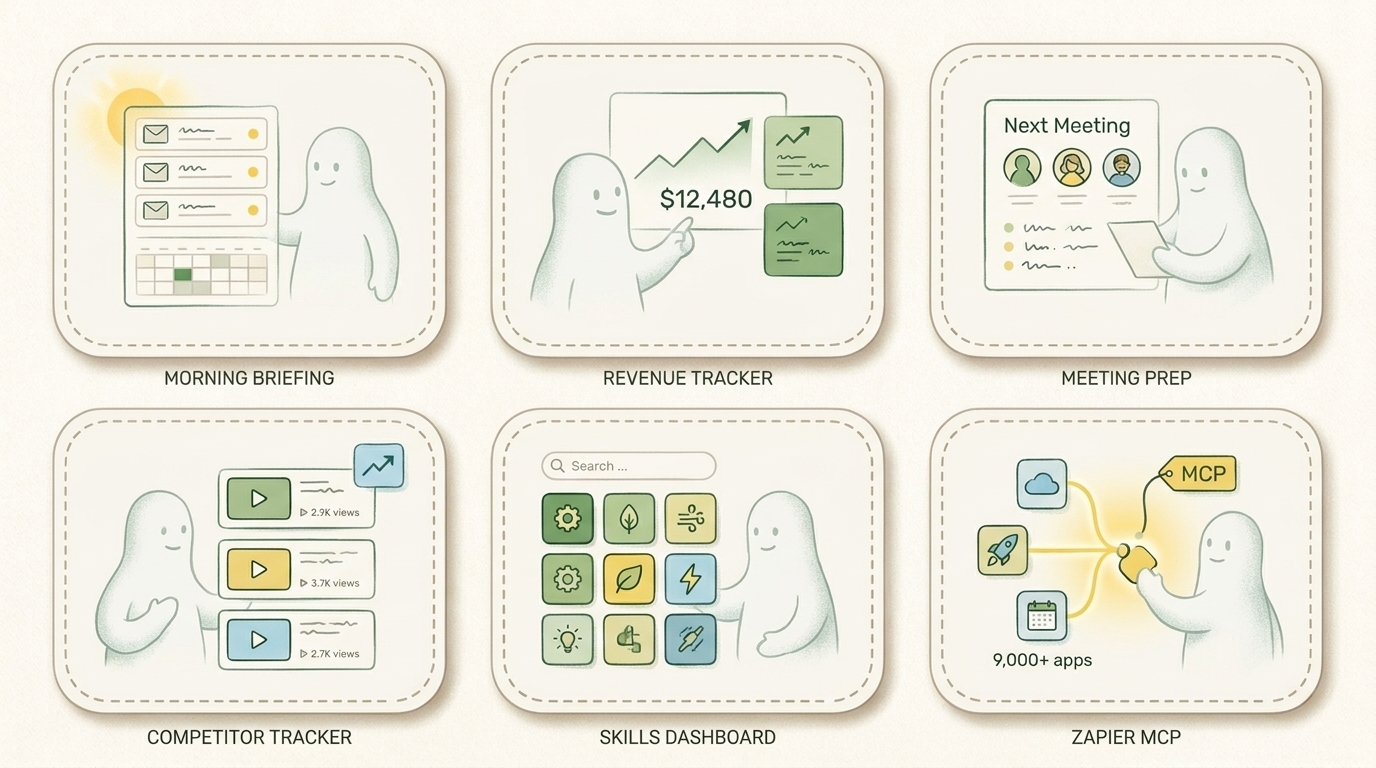
This is the one I actually recommend to everyone. Every day I open a Cowork artifact called "Morning Briefing" and it shows me, in one view:
- A TL;DR of new emails, including who wrote and what they want
- The top 3-5 that need a reply today
- My calendar for the day and the week ahead
- Inbox triaged into categories (client, partner, newsletter, noise)
- Link-click counts from Bit.ly for any tracked links in recent sends
I used to spend the first 20 minutes of my day on this manually. Now I open the artifact, read for 3 minutes, and know exactly what the day looks like.
How to build it. Connect Gmail and Google Calendar first. Then paste a prompt like:
Build me a morning briefing dashboard. Pull my unread emails from the last 24 hours, categorize them into "needs a reply today", "client thread", "partner", "newsletter", and "noise". For each in the first two buckets, write a 1-line TL;DR and a suggested reply angle. Then pull my calendar for today and the next 7 days. Group meetings by type. At the top, give me a single paragraph summarizing what the day looks like. Save this as a Live Artifact I can reopen each morning.
The dashboard will generate in about 10 seconds. Open it the next morning -- new data, same layout, no re-prompting.
2. The revenue tracker
The Stripe connector ships with Cowork. Point Claude at it and ask for a revenue dashboard and you get a live view of captured revenue, active subscribers, recent payments, and average payment size. Useful on its own.
The move most people miss is vibe-coding a small tool on top of the live data. I added a lightweight "outstanding invoices" tracker next to the live Stripe feed. I type the client name, amount, and status (invoiced, overdue, paid), and it sits next to the real revenue so I have one view of "money collected" plus "money owed". Total build time: 3 minutes.
How to build it. In Cowork, connect the Stripe app (writable permissions if you want Claude to create refunds or invoices from the dashboard -- read-only is safer for a first pass). Then prompt:
Build a revenue dashboard. Pull my last 90 days of Stripe payments. Show available balance, recent revenue, lifetime captured, active subscriptions, and average payment. Group payments by type using the payment link name (e.g. anything containing "partnership" = brand deal). Add a small tracker widget where I can manually add outstanding invoices with amount, status, and notes. Save as Live Artifact.
The version history inside each artifact matters here. If you tweak the widget and break it, roll back with one click.
3. The meeting prep dashboard
This one punches above its weight. Claude pulls your next calendar meeting, the attendees, any email thread with those people, and generates three talking points based on the context. You open it two minutes before the call and you walk in prepared.
How to build it. Calendar connector + Gmail connector. Prompt:
Build a meeting prep dashboard. Pull my next scheduled meeting from Google Calendar. List the attendees. Search Gmail for any thread in the last 90 days involving those attendees or their domain. Summarize the state of the conversation in 3 bullets. Generate 3 talking points I should raise based on the thread and the meeting title. Save as a Live Artifact, always reflecting my NEXT meeting.
Open it once a day, five minutes before the first call. It updates itself. The attendees, thread, and talking points change every time you open it -- the layout stays put.
4. The competitor content tracker
This one is specific to creators and marketers. I use Apify to scrape YouTube channels and Instagram accounts in my niche, and the artifact shows me which videos are trending, which keywords are repeating, and what topics my competitors posted in the last 48 hours.
Without Live Artifacts, you either pay for a niche tool like VidIQ or you run the scrape manually and paste the results into a Claude chat. With a Live Artifact, the scrape runs on open and you get a fresh read every time.
How to build it. Connect Apify (Cowork has a native integration). Set up a YouTube scraper actor that watches 10-15 channels in your niche. Then:
Build a competitor content tracker. Use my Apify YouTube scraper to pull the last 7 days of uploads from the saved channels. Show top performers by view velocity, recent uploads under 48 hours old, trending keywords across all titles, and the average engagement per channel. Save as a Live Artifact.
This one I am still tuning. Thumbnails do not render well yet and I have to hand-curate the channel list. But as a read on what is taking off in my space, it replaces three tabs.
5. The skills dashboard
If you are deep in Claude Code or Cowork, you have probably written 20-100 skills by now. Keeping track of which one does what, and which slash command triggers it, is a real problem. I used to run a nightly scheduled task that regenerated an HTML index of every skill. It worked, but it chewed through tokens for a job that only needed to run on demand.
Now I have a Live Artifact that reads my skills directory on open. Click any skill to see what it does and which slash command fires it. No tokens spent overnight. No stale index.
How to build it. You need a path Claude can read. I point it at /Users/me/.claude/skills/. Prompt:
Read every SKILL.md in my skills directory. Build a searchable dashboard showing: skill name, one-line description, trigger command, and category. Sort alphabetically. Add a search box. Save as a Live Artifact. On each open, re-read the directory and reflect any newly added skills.
Scales to 237 skills without breaking -- I checked.
When a connector does not exist: Zapier MCP
Not every app you use has a native Cowork connector. Notion, Linear, Pipedrive, and a hundred others are still missing. The workaround is Zapier MCP, which exposes 9,000+ apps through a single MCP server you can add to Cowork in about 30 seconds.
Steps:
- Go to zapier.com/mcp, click "new MCP server", pick "Claude Cowork" as the client.
- Add any apps you need -- Notion, Zendesk, HubSpot, Slack, whatever. Zapier handles the auth for each.
- Copy the MCP server URL into Cowork's connector settings.
- Prompt Claude to build a Live Artifact using the new connector.
The tradeoff: Zapier adds a small latency hop and costs $20-50/month once you go past their free tier. For anything that has a native Cowork integration, skip Zapier. For the long tail of "I use this one app and nobody else does," it is the cleanest path.
Gotchas nobody warns you about
Four things I learned the hard way so you do not have to.
1. Connector permissions matter more than you think. Read-only is the default for most apps. If you want the artifact to write back -- create a draft email, schedule a meeting, update a Stripe invoice -- you have to explicitly grant write access in the connector settings. Get it wrong and the artifact fails on write with no error message.
2. Live does not mean instant. Each open triggers a fresh pull. On a Stripe dashboard with 90 days of history that is 5-10 seconds. On a Gmail + Calendar + Stripe + Apify combo, 15-20 seconds. Plan for it. Open the artifact before you actually need it.
3. Version history is your friend. Vibe-coding on a Live Artifact is fun until you break the layout. Every artifact keeps a version history -- use it. I roll back 2-3 times a week.
4. Token cost is real on complex artifacts. Simple dashboards (Gmail digest, calendar view) are cheap. Dashboards that pull 90 days of Stripe data plus 15 Apify scrapers can eat 3-5% of a Pro plan's daily budget per open. Watch the meter for the first week.
Who should actually build these
Not everyone. If you are a solo consultant or founder running a small business, the morning command center and the meeting prep dashboard are instant wins -- build them this week. If you are a content creator, add the competitor tracker. If you run a SaaS with any Stripe revenue, the revenue tracker pays back the setup time in the first week.
If your work is mostly deep-focus code or writing, most of this is a distraction. The skills dashboard is the only one that matters for you, and only if you have crossed the 30-skill mark.
FAQ
Do I need a Max plan for Live Artifacts?
No. Live Artifacts are on every paid Cowork tier, including Pro ($20/month). The difference is usage limits -- Pro caps daily tokens lower than Max. For a single morning command center, Pro is plenty.
Can I share a Live Artifact with someone else?
Not yet. Artifacts are scoped to your Cowork workspace. If you want to share the underlying data, export the dashboard as HTML and send that, but the live-refresh behavior will not carry over.
Do Live Artifacts work with Claude Code?
No. Claude Code is terminal-first and does not render HTML artifacts. Cowork is the desktop app and is where this feature lives.
What happens when a connector goes offline?
The artifact will render but show empty data in the affected panel. Gmail, Calendar, and Stripe have the most stable connectors in my experience. Apify and MCP-based connectors fail more often -- plan for graceful degradation.
Can I schedule a Live Artifact to run on its own?
Yes. Pair the artifact with a Dispatch (Cowork's scheduled-agent feature) and trigger it on a cron. But the point of Live Artifacts is that you no longer need to -- open on demand, pay only for what you look at.
How is this different from a BI dashboard like Metabase or Looker?
A BI dashboard queries a database you control. A Live Artifact queries the apps you already use -- email, calendar, Stripe, Notion -- without you having to ETL anything into a warehouse first. BI is better for big-data questions. Live Artifacts are better for "what is happening right now across my tools".
The smallest useful next step
Build one Live Artifact this week. Just the morning command center. Hook up Gmail and Calendar, paste the prompt above, and open it tomorrow morning. If it saves you 10 minutes, build the next one. If it does not, you have lost 5 minutes and learned that this is not your workflow.
For the setup basics, read how to use Claude Cowork first. For the broader tool stack, see 5 AI tools I use every day and the best AI tools for small business in 2026. If you are stuck deciding what to automate in the first place, how to implement AI in your business walks through the four-phase framework.
The real shift Live Artifacts represent: software is becoming something you build in the moment for one job, not something you buy off a shelf and hope it fits. One dashboard per problem. Built in three minutes. Refreshed for free. That is the whole game.
If you want me to build this layer for your team -- connectors, five custom artifacts, full handoff -- book a 2-week engagement. Scope: discovery, connector setup, five production-ready Live Artifacts, and a 30-day fix guarantee. Fixed fee: $5K-$8K.