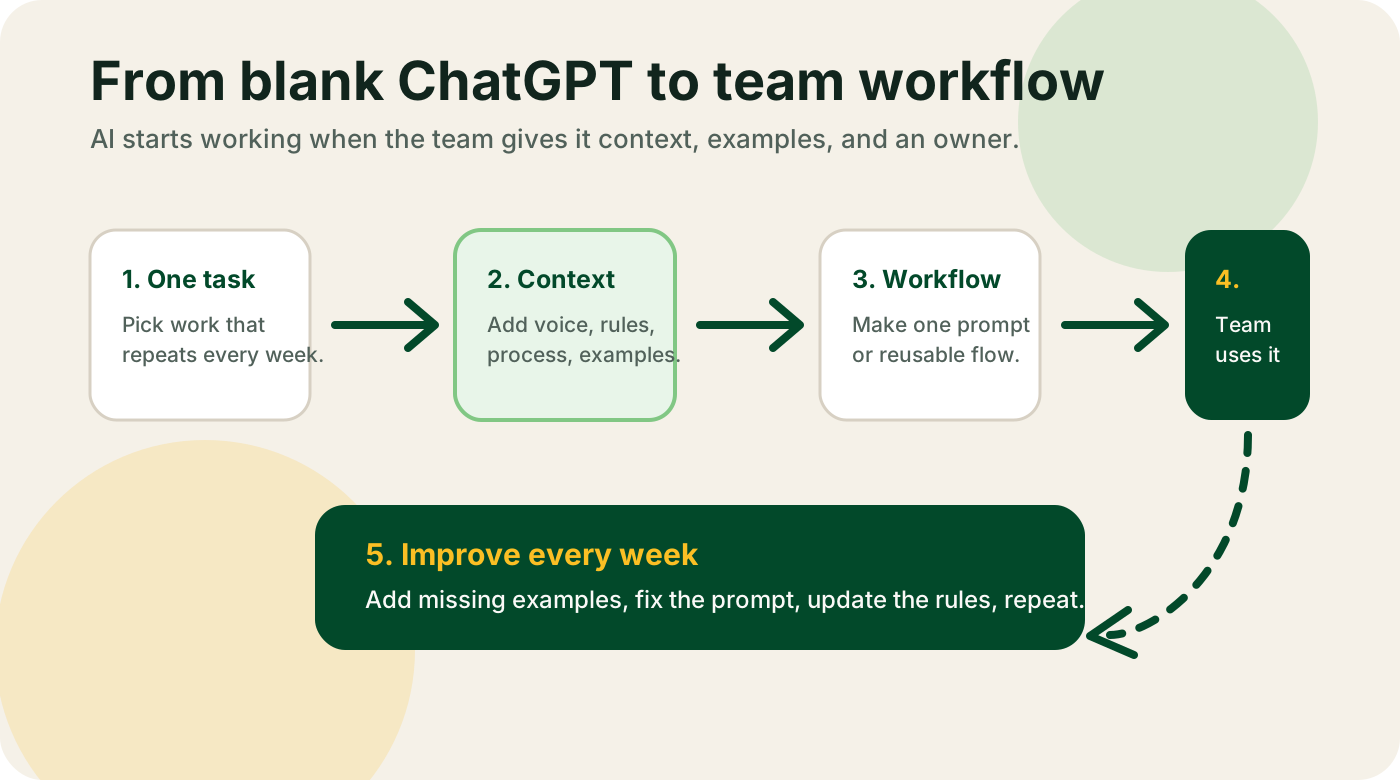
Most small businesses don't need a new AI product. They already pay for a CRM, an email tool, a support app, a project tracker, and some kind of document system. Between them, they've got 80-90% of the data AI needs to be useful. The missing piece is wiring.
AI integration consulting is the work of picking up that wiring and doing it. Pick the right AI model, pick the right glue layer, connect it to the tools you've been paying for all along, and hand the finished workflow to a human owner who can run it without asking you questions twice a week. That's the job. No new SaaS. No "AI platform." No three-month "integration roadmap."
This post is the plain version. What AI integration consulting is, the three-layer stack that explains how every successful integration works, the top tools small businesses should wire up first, what a good 10-day engagement looks like, what it costs, and how to tell a real integration engineer from someone who just knows how to click around Zapier.
What AI integration consulting is
It's the work of connecting an AI model (Claude, ChatGPT, or similar) to the software your team already uses every day, so that the AI can read from those tools, write back to them, and trigger actions on your behalf.
Concrete examples:
- Your CRM gets a new inbound lead → Claude researches the company, drafts a first-touch email, and updates the contact record -- all without a human clicking anything.
- A support ticket hits Intercom → an AI classifies the priority, pulls the relevant docs from Notion, drafts a reply, and either sends it (for tier-1) or routes it to a human (for tier-2).
- A customer fills out an onboarding form → the data flows into your CRM, the AI reads the responses, generates a personalized welcome email plus a custom onboarding checklist, and schedules the next touch in your calendar.
- A weekly report needs writing → the AI pulls data from your CRM, analytics, and billing tool, writes the first draft, and posts it to a shared Slack channel every Monday at 9am.
These are all integrations. None of them require a new AI product. All of them use tools you probably already pay for, glued together with a small piece of middleware and a well-written system prompt.
What it isn't:
- Custom model training. Integration consulting uses off-the-shelf models. If someone's quoting you "AI integration" and the scope includes fine-tuning, that's a different (much more expensive, usually wrong) project.
- Building your own AI platform. You don't need one. 99% of small-business AI integrations can be built on n8n, Zapier, Make, or a simple backend function. If an agency wants to build you "a custom AI layer," they're selling you software you'll have to maintain forever.
- Replacing SaaS you already pay for. A good integration engineer will respect your existing stack. If the first recommendation is "move off HubSpot to a new CRM," walk away. That's a migration project with AI as a sales prop.
- AI chatbots on your website. Sometimes falls under integration, but it's a narrow slice of it and usually not the highest-impact place to start. Save it for later.
The three-layer stack
Every working AI integration I've ever built has the same three layers. When I audit a failing integration project for a client, the fix is usually that one layer is missing or broken.
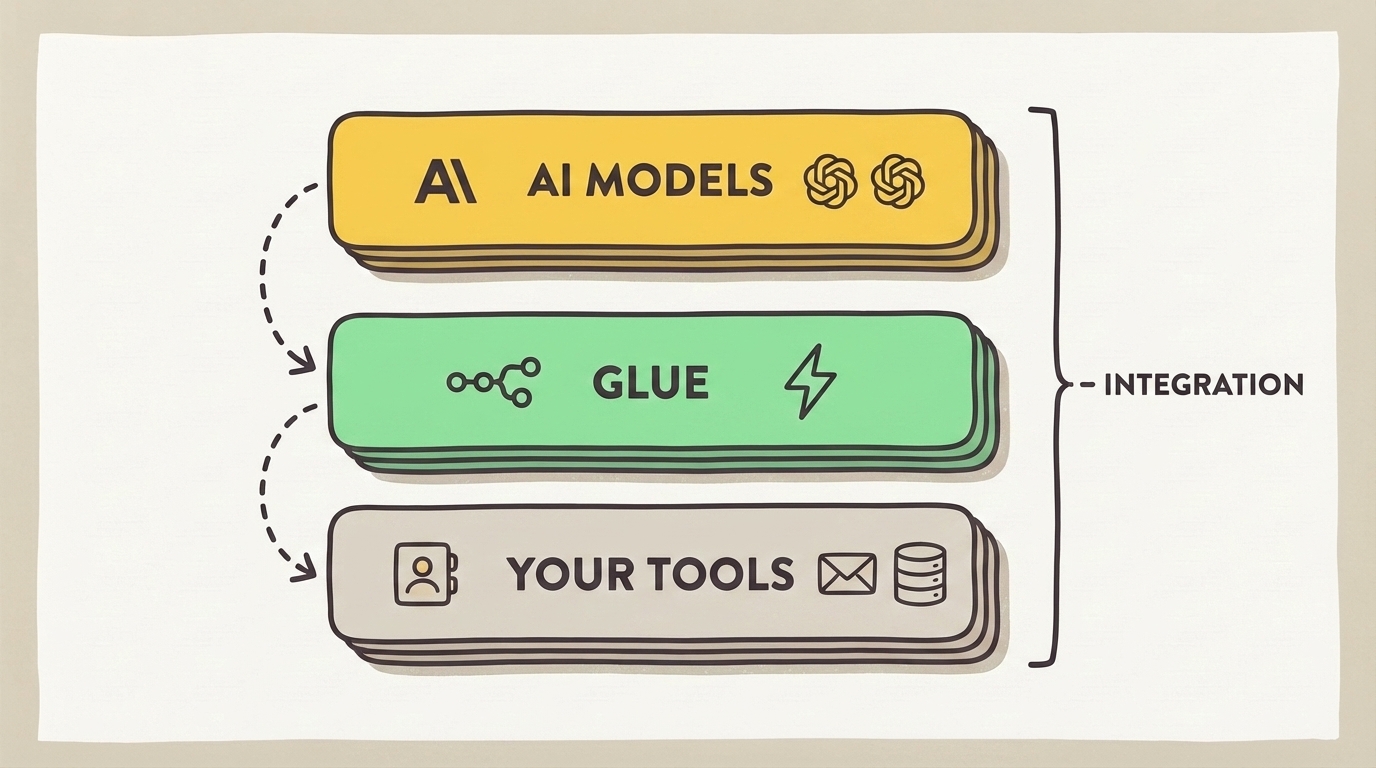
Layer 1: AI models. At the top. This is Claude, GPT-4o, Gemini, or similar. The model does the thinking -- drafting, reasoning, summarizing, extracting structured data. You don't need multiple models for most small-business work. One good one (Claude for writing and reasoning, or GPT-4o for general assistant tasks) covers 90% of use cases.
Layer 2: The glue. In the middle. This is what moves data between your tools and the AI. Options:
- n8n (self-hosted or cloud) -- my default recommendation. Open source, owns its data, has first-class AI nodes, and runs any workflow you can describe.
- Zapier -- easiest for non-technical teams. "AI Actions" let you run Claude or GPT inside a zap without extra setup. Slightly pricier at scale.
- Make.com -- more powerful than Zapier, steeper learning curve. Only worth it if you've outgrown Zapier and n8n doesn't fit.
- Simple backend function -- for teams with a dev. A tiny Node.js or Python service running on Vercel, Fly, or similar. More flexible, more maintenance.
Layer 3: Your tools. At the bottom. Your CRM, email platform, support tool, docs, calendar, billing, analytics. The stuff that already runs your business. This layer provides the input the AI needs (customer records, ticket content, past emails) and receives the output (draft replies, updated records, scheduled tasks).
An integration works when all three layers are in place. A project fails when someone skips the middle layer ("the AI will just figure it out") or the top layer ("we'll use any model, it doesn't matter which"). Both of those are wrong.
Most failed AI projects I audit are failures of layer 2 -- the glue. Small businesses either try to skip it entirely (paste data into ChatGPT manually every morning) or build custom middleware that nobody can maintain after the original developer leaves.
The 6 integrations that deliver most of the value
I've shipped or audited enough integrations to say with confidence: these six cover 80% of the ROI in a small-business AI integration engagement. Start with one of them.
1. CRM enrichment and auto-drafting
What it does: New inbound lead arrives in your CRM. The AI researches the company (site, social, news), fills in missing fields, and drafts the first outreach email. A human reviews and sends.
Why it wins: Removes 10-15 minutes of manual research and drafting per lead. For a team processing 40 leads a week, that's 7-10 hours saved.
Stack: HubSpot or Attio (layer 3) + Clay or n8n (layer 2) + Claude or GPT-4o (layer 1).
Setup time: 1-2 days including prompt tuning.
2. Support ticket triage and first-reply drafting
What it does: New support ticket hits Intercom, Plain, or Zendesk. AI classifies urgency, tags topic, pulls relevant help-docs, and drafts a reply. Tier-1 tickets get sent automatically. Tier-2+ route to a human with the draft attached.
Why it wins: Cuts average response time from hours to minutes for easy tickets and gives your humans a head-start on hard ones.
Stack: Intercom/Plain (layer 3) + n8n or native AI features (layer 2) + Claude or Intercom Fin (layer 1).
Setup time: 2-3 days for the first pass.
3. Meeting notes → CRM updates
What it does: A sales or customer-success call ends. Granola records and transcribes. AI extracts action items, updates the CRM with call notes, creates follow-up tasks, and drafts the follow-up email.
Why it wins: Nobody updates the CRM after calls. This integration means nobody has to.
Stack: Granola or Fathom (layer 3) + n8n (layer 2) + Claude (layer 1) + CRM (back to layer 3).
Setup time: 1-2 days.
4. Weekly report generator
What it does: Every Monday at 9am, the AI pulls data from your CRM, analytics, and billing tool, writes a one-page summary with wins, risks, and suggested next steps, and posts it to a shared Slack channel.
Why it wins: Reports are one of those tasks everyone agrees should exist but nobody wants to write. Automate the first draft. A human adds the one insight they care about.
Stack: CRM + analytics + billing (layer 3) + n8n scheduled workflow (layer 2) + Claude (layer 1) + Slack (back to layer 3).
Setup time: 2-3 days.
5. Docs → AI knowledge layer
What it does: Your internal docs (Notion, Google Docs, Confluence) get indexed and fed to an AI that can answer team questions in Slack. "Hey @ai, what's our refund policy for annual plans?" → pulls from docs, cites sources, replies.
Why it wins: New hires stop pinging the same people with the same questions. Senior people get their afternoons back.
Stack: Notion or Google Docs (layer 3) + n8n or a lightweight RAG setup (layer 2) + Claude (layer 1) + Slack (back to layer 3).
Setup time: 2-4 days depending on how clean your docs are.
6. Invoice/payment reminders with personal touch
What it does: Billing tool shows an overdue invoice. AI looks up the customer in the CRM, checks their engagement history, writes a personalized reminder email (friendly for good customers, firmer for patterns), and sends it.
Why it wins: Accounts receivable runs itself. Cash flow improves. No more awkward "sorry, the invoice bot sent this" conversations.
Stack: Stripe or QuickBooks (layer 3) + n8n (layer 2) + Claude (layer 1) + email.
Setup time: 1-2 days.
Any of these, shipped well, saves real hours. All six together is usually too ambitious for a first engagement -- pick one, ship it, then add the next.
What a good engagement looks like
Integration work is shorter than implementation work because the thinking has already been done. You're not deciding what to build -- you're deciding how to wire a specific thing. The right engagement shape for small business is about 10 working days.
Days 1-2: scope and design. One call to pick the integration (usually one of the six above, sometimes a variant). Then I map the data flow -- what comes from which tool, what goes where, who sees the output. Output: a one-page data flow diagram and a list of the accounts I'll need access to.
Days 3-5: build. I write the middleware in n8n or Zapier, write the system prompts, wire up the accounts, and run the whole thing against 3-5 real cases from the past week. This is where most of the engagement time goes, because integration work is 70% fixing edge cases you didn't think of.
Days 6-7: test with the owner. The person on your team who'll own the integration runs it end-to-end while I watch. They'll find things I didn't -- the weird lead format, the customer who uses a nickname, the edge case where two fields contradict each other. We fix those together.
Days 8-9: cut over. The integration becomes the real workflow. Old manual process retires. I write the playbook and the "what to do when it breaks" doc.
Day 10: handoff. Final call. Loom walkthrough. 30-day fix guarantee kicks in -- if something breaks in the first month, I come back for free.
Total meeting time for your team: about 3 hours across 2 weeks. Total owner time: 4-8 hours. Total consultant time: 20-30 hours. Fixed cost: usually $4,000-$8,000.
If you're being quoted 6-8 weeks for a single integration on a 10-30 person team, you're being billed for bench time. Walk away.
What AI integration consulting should cost
The range is narrower than general AI consulting because the scope is more constrained.
Single integration, fixed fee: $4,000-$8,000. One of the six workflows above, fully built and handed over with a playbook. Includes a 30-day fix guarantee. This is my sweet spot and the right starting point for most small businesses.
Multi-integration engagement: $10,000-$20,000. 3-5 integrations over 4-6 weeks, usually scoped as "fix the top three workflow bottlenecks at once." Only makes sense if you've already shipped one integration and want to accelerate.
Hourly support: $150-$300/hour. For clients who have an integration running and need occasional fixes or tuning. Rare as a standalone engagement -- usually tacked on after a fixed-fee project.
Monthly retainer: $1,500-$4,000/month. Ongoing "integration owner" for teams that don't have an internal technical person. Makes sense if you have 3+ integrations running and need someone to maintain them. Does not make sense for the first project.
Custom AI platforms or bespoke integration frameworks: $30,000-$100,000+. Avoid. You don't need this. Anyone quoting this range for a team under 50 people is either misunderstanding your problem or knowingly oversizing the project.
The tools that make integration easy (and the ones that don't)
Best glue layers for small business:
- n8n (self-hosted free, cloud $20-50/month) -- my default. Open source, runs AI workflows natively, has first-class integration with Claude/OpenAI/Gemini. Steep learning curve for the first project, flat for the next.
- Zapier ($20-100/month) -- best for non-technical teams. AI Actions let you run Claude or GPT inside a zap with no custom code. Slightly pricier when you scale past 10,000 runs/month.
- Make.com ($10-30/month) -- more power than Zapier, steeper learning curve. Only pick this if your integrations are complex enough that Zapier would cost more.
- Direct API integrations via a small backend function -- for teams with a developer. Vercel Functions, Fly, or AWS Lambda with a few hundred lines of TypeScript or Python. Maximum flexibility, maximum maintenance.
Best AI layer for small business integrations:
- Claude (via API) -- best at following instructions and staying inside brand voice. Works well for drafting, extraction, classification.
- GPT-4o (via API) -- best if you need image, voice, or vision in the pipeline.
- Gemini (via API) -- cheapest at scale, good for high-volume classification or summarization.
One model is usually enough. Multi-model routing is an optimization for later, not a starting point.
Tools to avoid for integration work:
- "AI platform" SaaS that promises to "handle all your integrations" for a monthly fee. These tools exist because small businesses are scared of integration work. The tools rarely do 80% of what a real integration needs and cost 3-5x more than just building it yourself in n8n.
- Custom-built integration frameworks sold by agencies. Unless you're a 500+ person company with unique needs, this is vendor lock-in dressed up as "scalability."
- Any integration that requires moving off a tool you already like. A good integration works with your current stack, not around it.
Red flags when hiring an AI integration consultant
Four things to watch for. Each one has killed at least one engagement I've seen up close.
1. They need "a few weeks" to scope. Real integration work is small. A 20-minute call should be enough for a rough scope. If someone needs 3 calls and a week of shadowing before giving you a price, they're either slow or padding.
2. They won't work inside your existing stack. "We need you to move to Platform X for the integration to work" is a red flag. A good integration engineer works with what you've got. The only valid reason to push you to a new tool is if your current tool literally has no API -- which is rare in 2026.
3. They write custom code when n8n would work. Custom code is job security for the developer, not the best outcome for you. Ask: "could this be built in n8n or Zapier?" If the answer is "technically yes, but..." then the engineer is over-engineering. The right answer for most small-business integrations is "yes, and that's how I'd build it."
4. No 30-day fix guarantee. Integrations are fragile in the first month. APIs change, edge cases appear, new data types break old assumptions. A good consultant expects this and bakes a 30-day follow-up into the fee. A bad one ships the integration, bills you, and disappears -- then charges hourly for the first bug fix.
DIY vs hire an AI integration consultant
Do it yourself if:
- You have one developer or a technical founder
- You already use n8n or Zapier for non-AI automations
- The integration is a small one (one tool → AI → one tool)
- You have a weekend to learn the tool and build it
Start with how to implement AI in your business, grab the free AI starter kit, and build the first integration in n8n yourself. Most small teams with a technical person can ship a working CRM-enrichment integration in 1-2 days of focused work.
Hire an integration consultant if:
- Nobody on your team is comfortable with API work
- You've tried Zapier and it doesn't do what you need
- The integration has to touch 3+ tools at once and you don't want to design the data flow yourself
- You want a written playbook so the next hire can maintain the integration
- You have $4K-$8K available and want it shipped and running inside 10 days
At $5K for a 2-week engagement including build, handoff, and 30-day guarantee, most integrations pay back the fee inside 60 days through time savings alone. The real win is that after the first integration ships, your team knows how to build the next one themselves. The consulting fee is partly for the work and partly for the skill transfer.
The smallest useful next step
If you're still deciding whether to hire an integration consultant or do it yourself, run this single exercise this week:
- Pick one workflow on your team where data moves between two tools and someone has to copy-paste it. (Examples: new lead → outreach email, meeting → CRM notes, support ticket → reply draft.)
- Write down exactly what comes from where, what gets generated, and what gets written back. One page. This is your data flow.
- Open n8n or Zapier (free tiers) and try to build the first step -- just read the data from one tool. Don't try to get to AI yet. See how long it takes you.
If step 3 takes you 30 minutes, you can DIY the whole integration in a weekend. If step 3 takes you 4 hours of frustration, that's your signal to hire someone. The cost of waiting another quarter to ship the integration is usually higher than the consulting fee.
Getting help
If you want me to design and build your first AI integration, book a 2-week engagement. Scope: one integration, fully built, tested with your owner, handed over with a playbook and 30-day fix guarantee. Fixed fee: $5K-$8K depending on complexity.
You can also read:
- AI consulting for small businesses -- the general version covering all flavors of consulting
- How to implement AI in your business -- the four-phase framework for going from zero to shipped
- AI marketing consulting -- specifically for marketing team integrations
- AI strategy consulting: when you need it and when you don't -- if you can't decide what to integrate first
- The best AI tools for small business in 2026 -- tool picks for every layer of the integration stack
The core message of this post: you probably don't need new AI tools. You need the ones you have wired together with a small, careful middle layer and a clear owner. Real AI integration consulting is the work of building that middle layer once, correctly, and getting out of the way. Everything else is either a software sale or a transformation project in disguise.